
Floor plans are a vital component of architectural projects, providing a scaled diagram of a room or building. These technical or diagrammatic drawings illustrate the horizontal relationships of spaces, providing the foundation for the design and construction of buildings. They enable the visualization of space, function, and compliance with relevant regulations.
In this article, we will examine the key components of a floor plan and provide step-by-step instructions on creating floor plans with ease using Vectorworks Architect.
What is a Floor Plan?
Most simply, a floor plan is a top-down view of a level of a building or room, drawn to scale. Floor plans serve as a crucial technical and communication tool for architects, designers, contractors, and more – ultimately acting as the guide for construction, design, and space planning. They help define the spatial relationships between different areas, allowing for the efficient use of space, and serve as a blueprint to visualize how a space will function and flow.
Traditionally, floor plans are presented in 2D, but as technology has evolved, some designers are finding success by presenting 3D floor plans – let’s take a closer look at them both.
2D Floor Plans
2D floor plans are flat diagrams representing a space as viewed from above. These flat diagrams illustrate the room layout, dimensions, and placements of key components, such as doors and windows. 2D floor plans are often favored for earlier designs or when quick comparisons and approvals are needed, and are essential in the construction and permitting phase of a project. Traditionally, they were hand-drawn, but are now created easily using Computer-Aided Design (CAD) software, which enables the creation of intricate 3D models.
3D Floor Plans
3D floor plans are further enhanced with depth to provide added realism and complexity to the designs, using design software. 3D floor plans are viewed from the top, and the projection can be changed from a flat orthogonal view to a top perspective view to enhance the drawings and provide a more relatable presentation of the plan.
These are particularly helpful when designing the furnishing of a space, as they showcase a more final visual design to bring the floor plan to life. These drawings are more complex and create a realistic view of the final space, often used in real estate or to show designs to clients. Learn more about how to efficiently transition 2D drawings to 3D modeling.
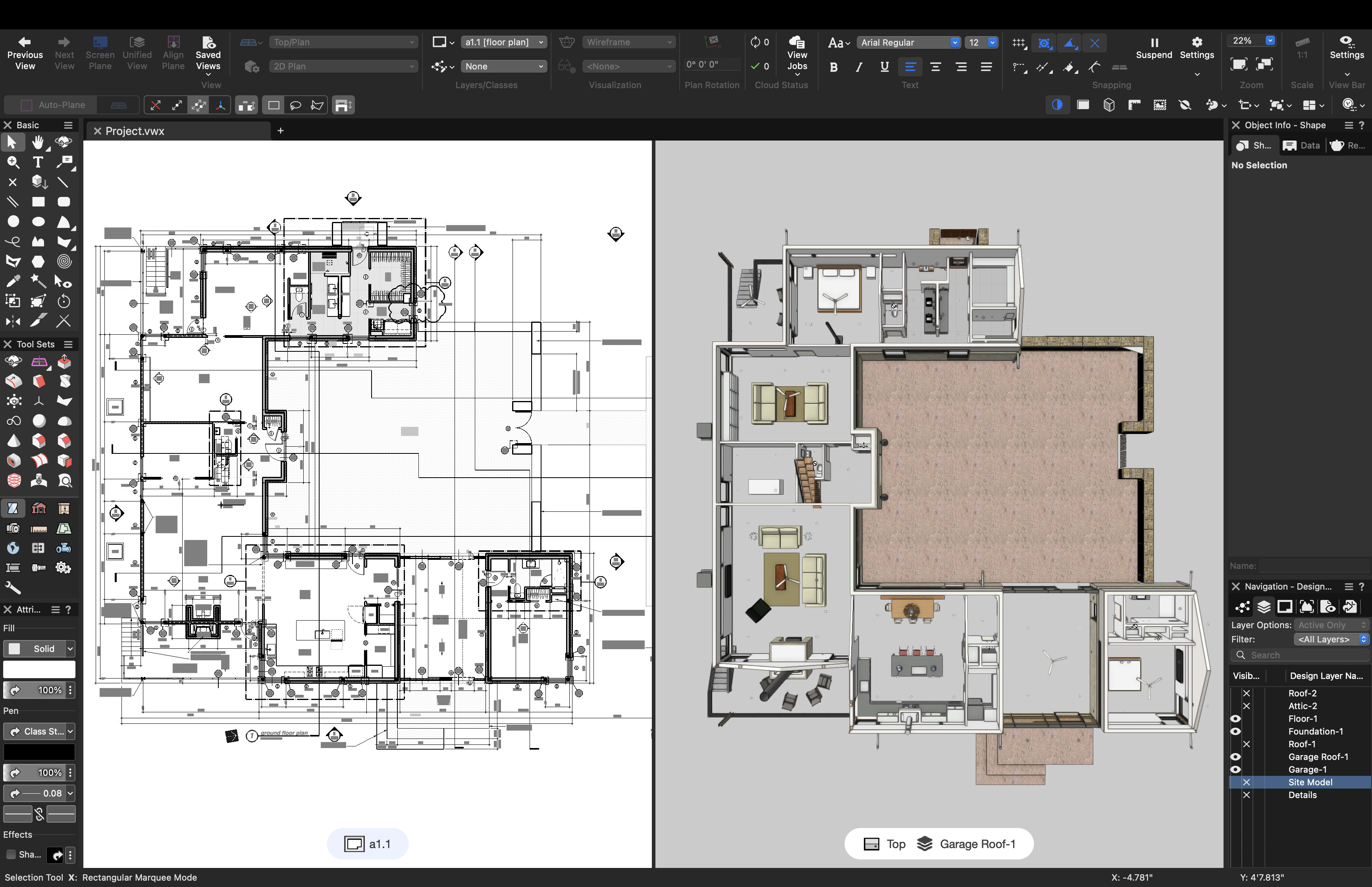
Floor plan models of a project in Vectorworks Architect.
The Benefits of Floor Plans
A floor plan is a vital architectural tool for creating a polished, finished space – from construction through to final design.
There are many benefits of floor plans, including:
Legibility: Floor plans enable you to visualize and understand the horizontal relationships between spaces, providing a clear blueprint for the final vision. They show the relationships between rooms in a building and how to navigate the finished space. Additionally, floor plans are key to understanding any other drawings provided and help orient the person reading the drawings.
Accuracy: Floor plans provide crucial information for constructability, accessibility, and code compliance. For example, floor plans provide contractors with necessary details on room dimensions, door and window specifications, and the locations of appliances and fixtures – all of which are required for a successful project.
Project Success: Quality floor plans enable accurate cost estimation from end to end for projects, provide clarity on needs for all teams, and facilitate the monitoring and inclusion of key information. These ensure that the project's overarching goals are met and help reduce errors by identifying flaws before costly construction begins. Floor plans also help keep the budget on track and provide information useful for quantifying various products, such as furniture, and specifying doors and windows – so you can accurately extract quantities, evaluate the embodied carbon of materials, and more.
DISCOVER THE TRENDS SHAPING THE AEC INDUSTRY
Vectorworks talked to hundreds of architects, designers, and others to see what technology trends are shaping the future of the AEC industry.
Key Elements of a Floor Plan
When building your floor plan, it’s important to consider all key elements that will impact the room’s design and construction, and note them accordingly so that there are no surprises at any stage of the project.
Every successful floor plan includes several key elements, including:
Specific measurements: Include measurements for the overall building size and dimensions, inclusive of ceilings and elevation markers.
Walls: Indicate all exterior and interior walls, noting which are load-bearing.
Doors and windows: Add locations and details for openings in the room, including the size and direction of swing.
Fixed installations: Notes for locations and measurements of electrical appliances, such as outlets and heaters, as well as plumbing fixtures, including sinks and bathtubs.
Structural elements: List notations and measurements for any structural elements such as stairs, columns, and more.
References: Note other drawings to review for more detail and information about the project, as well as any drawing keys to understand how to read the floor plan.

Complete 2D floor plan representing key elements.
How to Create Floor Plans
Now that we have explored what floor plans are, why they are necessary, and the key elements, let’s review how to use Vectorworks Architect to create your floor plans.
Vectorworks Architect is specifically designed to make creating floor plans easy, efficient, and professional. As the ultimate software for architecture design, you’re fully enabled to sketch, draw, and model in a fully integrated BIM workflow.
As projects progress through phases: conceptual design, schematic design, design development, and construction documentation. As the scale and detail of floor plans evolve, from broad spatial relationships to detailed technical documentation, Vectorworks allows you to carry your initial sketches all the way through this process, following the basic process below.
How to create a floor plan within Vectorworks Architect:
- Start your project: Import a site survey to locate the project, or if working on an existing build, import the survey file. Alternatively, you can start with a blank document or select a basic floor plan template or a blank document in Vectorworks Architect.
- Draw the building: Start by using the Wall tool to sketch the external and internal structural elements in meters or feet. You can adjust wall dimensions precisely using Smart Dimensions and the Object Info palette, and use dimensioning tools to annotate lengths and spatial relationships.
- Add key features: Insert doors and windows with their respective tools, selecting or customizing styles as needed. And, incorporate architectural elements such as stairs, columns, and spaces to complete the interior layout.
- Enhance your design: Drag and drop ready-made symbols to customize your space: furniture, kitchen, bathroom, and lighting fixtures, cabinets, wiring, and more. Plus, you can customize walls, windows, openings, hallways, and overall project dimensions with meaningful annotations, including a graphic scale.
- Organize your file: Leverage classes and layers to organize the project for further documentation or presentation as needed.
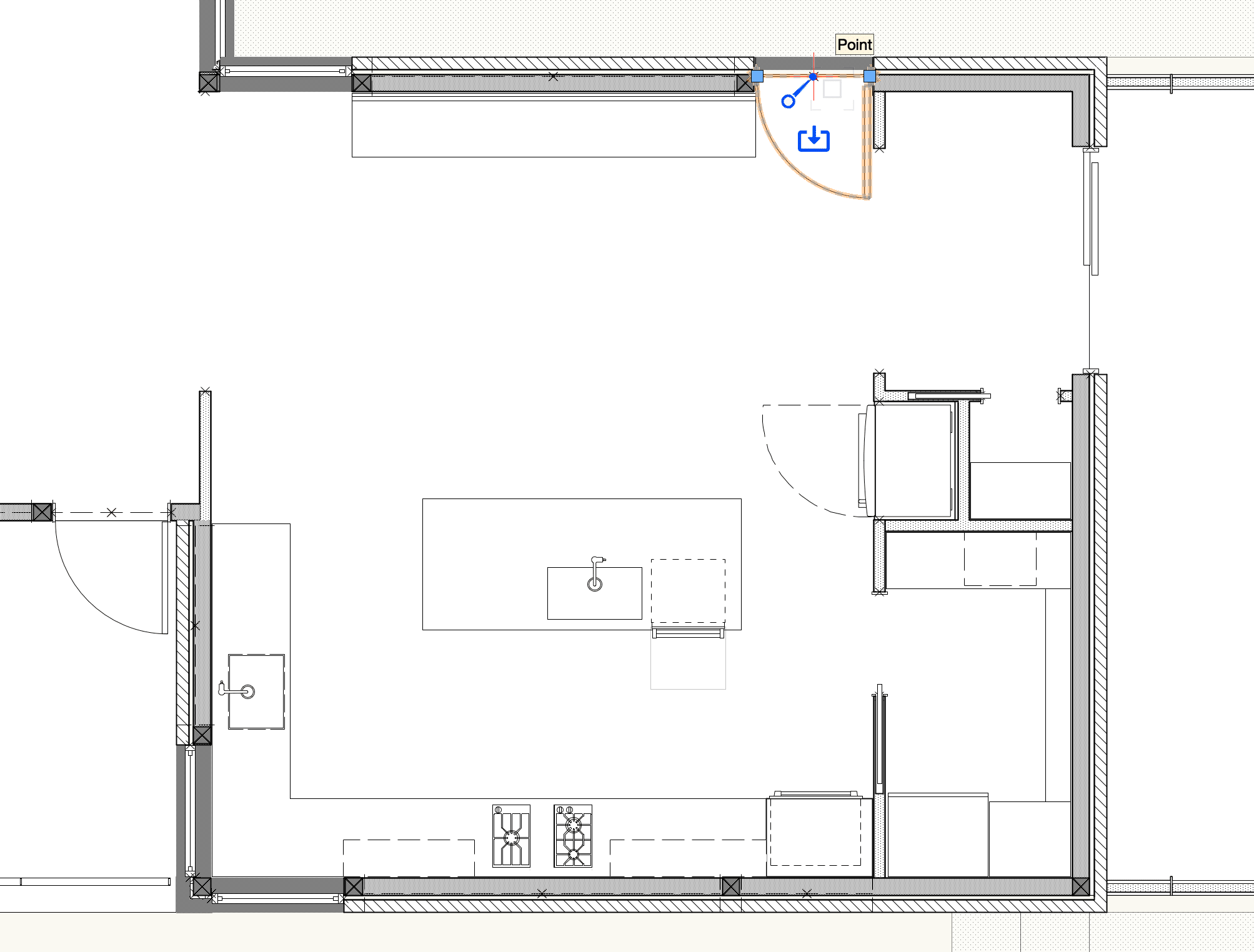
Floor plan creation in Vectorworks Architect.
Floor Plan Tips
As you develop floor plans, keep these proven best practices in mind to help ensure your designs are comprehensive and successful from start to finish.
Be mindful of accurate scale and proportion: These factors are vital to ensuring the floor plan is accurately represented, and all items are sized correctly in the space to facilitate movement and flow.
Pay attention to the details: For example, consider natural lighting when planning window locations for a room, and note which way doors swing to ensure they open and close smoothly in the room. Or, the flow of traffic when planning a city lot.
Prioritize appliance and fixture locations: Keep in mind that if these features are not decided on early, it can lead to space constraints and force revisions.
Compliance matters: Ensure that your floor plans align with local building codes and regulations to avoid the need for costly or rushed changes later.
Images courtesy of François Lévy Architecture and Interiors.
Bring your BIM designs to life.
Claim your free trial of Vectorworks Architect and start building your own floor plans today.
Stay in the know with the latest insights
Subscribers receive news, customer stories, success and learning tips, event information, and other important announcements from Vectorworks.
By submitting this form, you agree that Vectorworks, Inc. and its authorized partners may contact you in regards to news, offers, and the use of our software, services, and platforms. Learn more about our privacy practices and your data on our privacy page.*